
If you’ve browsed car listings in Jordan before, you know the real problem. It isn’t finding a car. It’s finding the right one without losing a whole weekend to it. Listings sit scattered across dealer pages, social media groups, and general classifieds sites. Each one has its own layout. Each one hides the one detail you needed in a different spot. A dedicated car marketplace helps with that. It puts official dealers, verified showrooms, and independent sellers in one place you can search.
That’s the idea behind Ordonauto. It’s a big part of why we rank it as the top pick on this site, mainly on trust and how fast its support responds, not because of any paid placement. This article isn’t a review, though. It’s a plain walkthrough of the site itself: what you click, in what order, to go from an empty search box to a real chat with a seller. If you want the fuller picture on why Ordonauto scores where it does against the other platforms we cover, that review is the place to look. Here, we just walk through the buying flow.
One more thing first. This guide only covers using the Ordonauto website to find a car and reach a seller. It doesn’t cover what happens after that first message. Inspecting the car, agreeing on a price, and handling paperwork all come later. We’ve written about each of those steps on their own, and we’ll point you to the right guide at the right moment.
Step 1: Open Ordonauto
Start by opening www.ordonauto.com in your web browser, on a computer or a phone. No special setup is needed. The homepage loads into a search bar and a row of quick tabs: All cars, New, Used, and Plates. Above that sits a stat showing how many official dealers and verified showrooms are live on the platform right now.
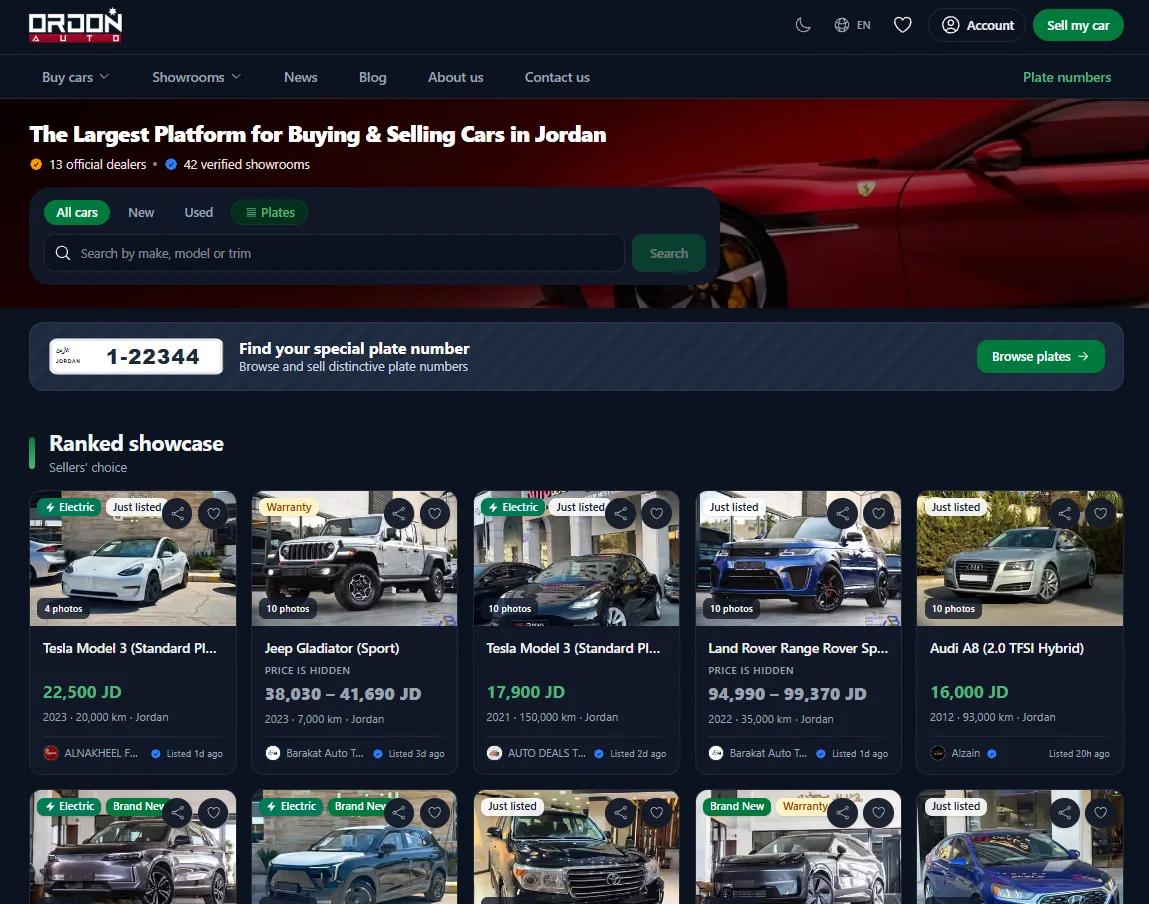
This homepage is also your starting point for the rest of this guide. You don’t need to know exactly what you want yet. Just get the page open. The next step will make more sense once you can see it in front of you.
Step 2: Choose a Car
Once you’re on the homepage, Ordonauto gives you three ways to start looking at real cars. None of them is the “right” one. Which you use just depends on how you like to shop.
Start From the Ranked Showcase
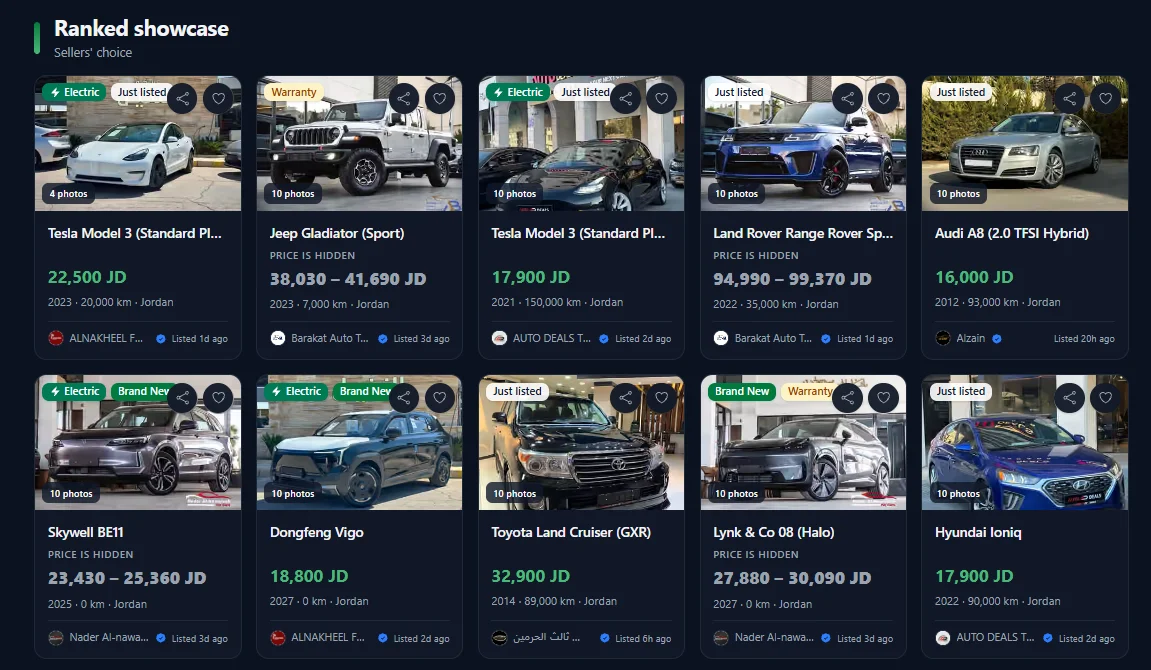
Scroll down from the search bar and you’ll land on the Ranked Showcase, labeled on the site as sellers’ choice. It’s a mixed grid of listings from different sellers across the platform. Each card shows a photo, price, year, mileage, and location at a glance. Think of it as a curated front page, not a full search result. It’s a quick way to see what kind of stock is out there right now, and it often surfaces newer or more notable listings before you’ve touched a single filter.
Browse Official Dealers and Verified Showrooms
Maybe you already have a brand in mind. Or maybe you’d rather stick to sellers the platform has verified. Either way, the second option is to browse by dealer or showroom instead. This view sorts listings by who’s selling the car, not just by the car itself. Each dealer or showroom entry shows a logo, a verification badge, and a link straight into that seller’s own listings.
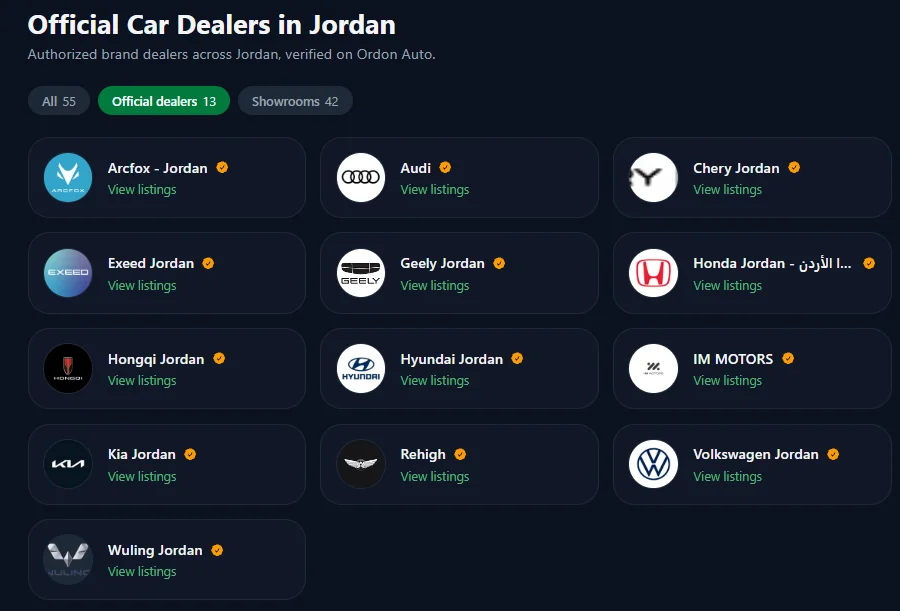
This is a genuinely different way to shop than scrolling a mixed feed. You pick a seller first, then narrow down to their cars, instead of picking a car and then checking who’s selling it. If you’ve had a good run with one dealer before, or you’d rather buy from an authorized brand dealer than an independent seller, this is the quicker route.
See Everything With “View All Cars”
The third option skips curation. Click “View all cars” and you get the full list of current listings on the platform, with no pre-selection at all. Reach for this once you’re ready to search properly, not just browse. It’s also the starting point for the filters covered in the next step.
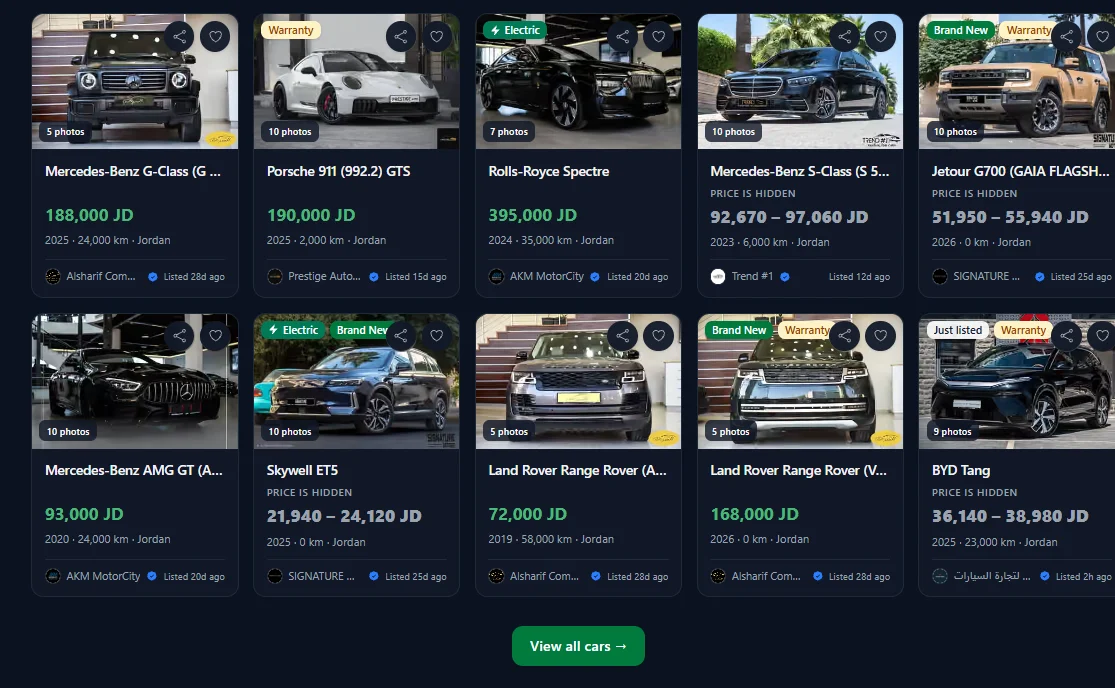
None of these three paths rules out the others. A sensible routine is to skim the Ranked Showcase first, just to get a feel for what’s out there. Check a dealer or two you already trust. Then move to the full list once you’re ready to filter for real. That’s what the next step covers.
Step 3: Filter and Choose a Car
However you got there, once you’re looking at a full list, filtering is what turns a wall of cars into a short list worth reading. Ordonauto’s filter bar sits at the top of the listings page, with six options: City, Make & Model, Price Range, Year, Kilometers, and More Filters.
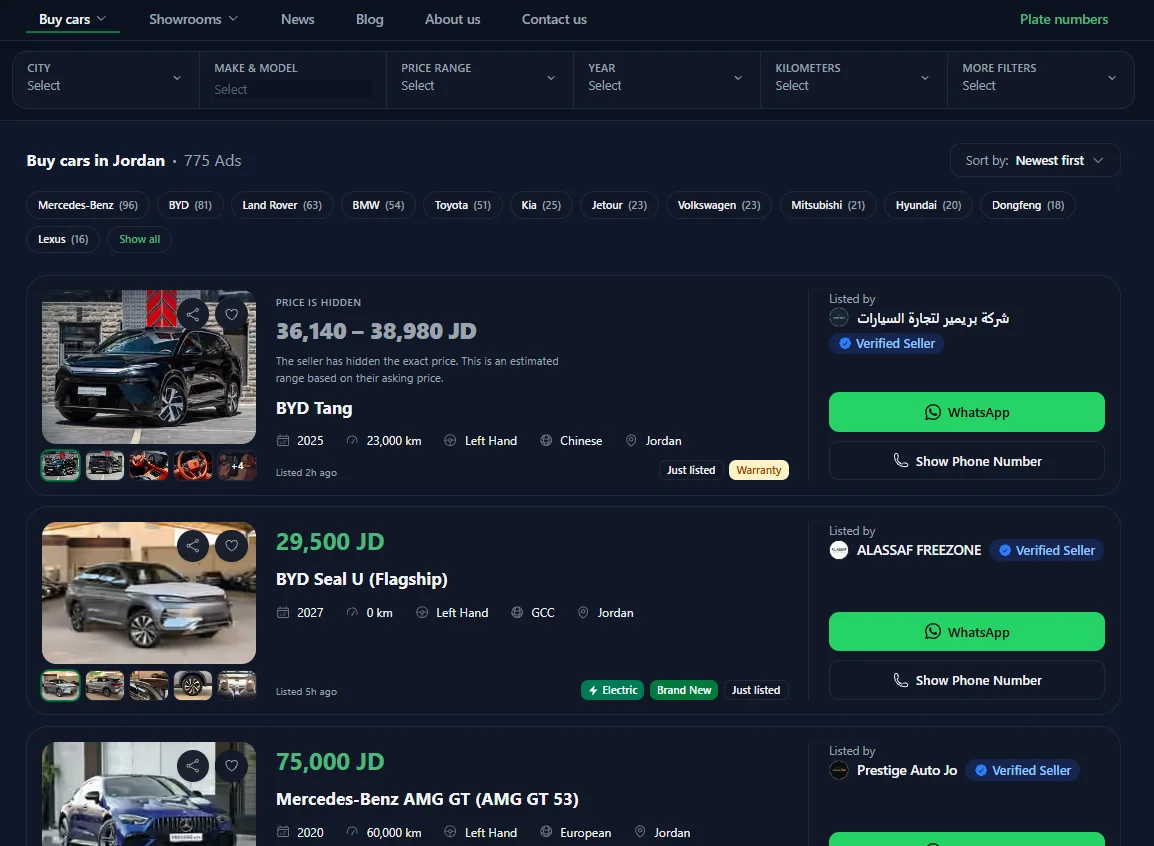
Each filter does a specific job. It helps to know what each one narrows down before you start clicking:
- City cuts the list down to cars near you, or in whichever city you’re willing to travel to for a viewing. A car two hours away sounds fine until you’re the one driving there to see it.
- Make & Model is the filter most people reach for first. It works well once you know roughly what you want. It’s less useful if you’re still torn between two or three options and want to compare across brands.
- Price Range keeps your search inside what you can afford. That matters, since listed prices on any general marketplace can swing wildly. Set a real ceiling here, and stick to it, so you don’t fall for a car you can’t justify.
- Year matters for more than how new a car feels. Newer model years usually mean fewer built-up mechanical problems, but also a higher price and faster early value loss. Older years cost less upfront, but shift more risk onto you at inspection time.
- Kilometers is a rough stand-in for wear, though a lower number isn’t always better. A ten-year-old car with low mileage that mostly sat parked can hide its own problems, exactly the kind of thing a proper inspection is meant to catch.
- More Filters catches anything the five main filters miss. Worth opening if your first pass returns too many results, or too few.
The goal of combining filters isn’t one perfect result. It’s a short list you can actually read closely, maybe ten or fifteen cars, instead of skimming past. Once you’ve set the filters that matter to you, look through what comes back. Open the listings that genuinely fit what you want, not just the first few on the page.
Reading the Tags on Each Listing
Once you’re looking at a filtered list, a handful of small tags on each card carry real information, and they’re worth reading before you click through. A “Verified Seller” badge next to a dealer or showroom name means that account has been checked by the platform, which is worth more than it sounds once you’re comparing a dozen similar cars from a dozen different sellers. Tags like “Just listed” and “Brand New” are self-explanatory, but still worth noticing, since a car listed an hour ago behaves differently in a negotiation than one that’s been sitting for weeks.
One tag worth understanding specifically is “Price is hidden.” Instead of a single number, the card shows a price range, with a short note that the seller chose not to display an exact figure and that the range shown is an estimate. That’s not unusual on a car marketplace, and it isn’t necessarily a red flag on its own. It just means you’ll need to message the seller directly, through WhatsApp or a phone call, to get an actual number before you can compare that car properly against others on your shortlist. Treat a hidden price as one more reason to reach out early, not a reason to skip the listing.
This basic idea, letting buyers filter a shared pool of listings by location, price, and spec, isn’t unique to car sites. Most classified marketplaces work this way. For general background on that model, see the Wikipedia entry on classified advertising. On the car side in Jordan, other platforms like OpenSooq offer similar filtering, though how closely listings get checked before going live differs from site to site. That’s part of what our Ordonauto review looks at in detail.
Step 4: Contact the Seller
Once a listing looks right, the last step is reaching out. On the listing page, Ordonauto gives you two ways to contact the seller directly: a green “WhatsApp” button and a “Show Phone Number” button, sitting side by side.

Clicking “WhatsApp” opens a chat with the seller. This suits questions you want in writing: extra photos, whether the car is still available, or a detail worth checking before you drive out to see it. A written message also leaves a record. That’s handy later if something the seller told you doesn’t match what you find in person.
Clicking “Show Phone Number” reveals the seller’s number so you can call them directly. This suits anyone who’d rather ask a few questions out loud and get a quick answer, instead of a back-and-forth string of messages. It’s also faster if you think the car might sell soon and don’t want to wait on a written reply.
Neither option beats the other across the board. Some sellers reply faster on WhatsApp, some are quicker on a call, and you often won’t know which until you try. If a car looks genuinely promising, there’s nothing wrong with using both. Send a short WhatsApp message to confirm it’s still available, then call once you’re ready to talk specifics, like a viewing time.
Did You Catch How the Site Works?
Five quick questions on the real buttons, filters, and steps covered above. Nothing is sent anywhere, this runs in your browser.
What Happens After You Message a Seller
Getting to a real conversation with a seller is the finish line for this guide. But it’s the starting point for the harder part of buying a car. Nothing about Ordonauto’s search and filters changes the basic homework you still need to do before you hand over money.
Whatever platform you find a car on, including Ordonauto, treat the listing photos and description as a starting point, not proof. Our guide to buying a used car in Jordan walks through the full process from that first message through to paperwork, including questions worth asking before you even arrange a viewing. And before you agree on a price, a proper inspection matters more than almost anything else in the whole process. Our guide to inspecting a car before you buy it covers what an independent mechanic should check, and why it’s worth paying for even on a car that looks fine at a glance.
It’s also worth thinking about who you’re buying from, not just which car you’ve picked. A listing through an official dealer or a verified showroom on Ordonauto tends to come with cleaner paperwork than a private seller might offer, though private sellers are often more open to negotiating on price. Our comparison of private sellers and dealers in Jordan goes through the trade-offs of each in more detail. That’s useful context once you’re deciding between two similar cars from different kinds of sellers.
A Sensible Routine for Using the Site
Put together, a reasonable way to use Ordonauto looks like this. Start broad, either through the Ranked Showcase or the full “View all cars” list, just to get a feel for what’s out there at your budget. Apply City, Price Range, and Make & Model once you know roughly what you’re after. Narrow further with Year and Kilometers. Read through the short list that’s left, rather than the first result that shows up. Then reach out. Use WhatsApp if you want a written back-and-forth first, or Show Phone Number if you’d rather just talk.
None of that is complicated, and that’s the point. The site itself isn’t the hard part of buying a car in Jordan. The hard part is everything that happens after you’ve found one worth a closer look. That’s exactly why we’ve written separate guides for the inspection, the negotiation, and the paperwork that follow. For a wider look at how Ordonauto compares to the other platforms covered on this site, our homepage breaks down the full field. Our Ordonauto review goes deeper into why it holds the top spot here, specifically on trust and support.